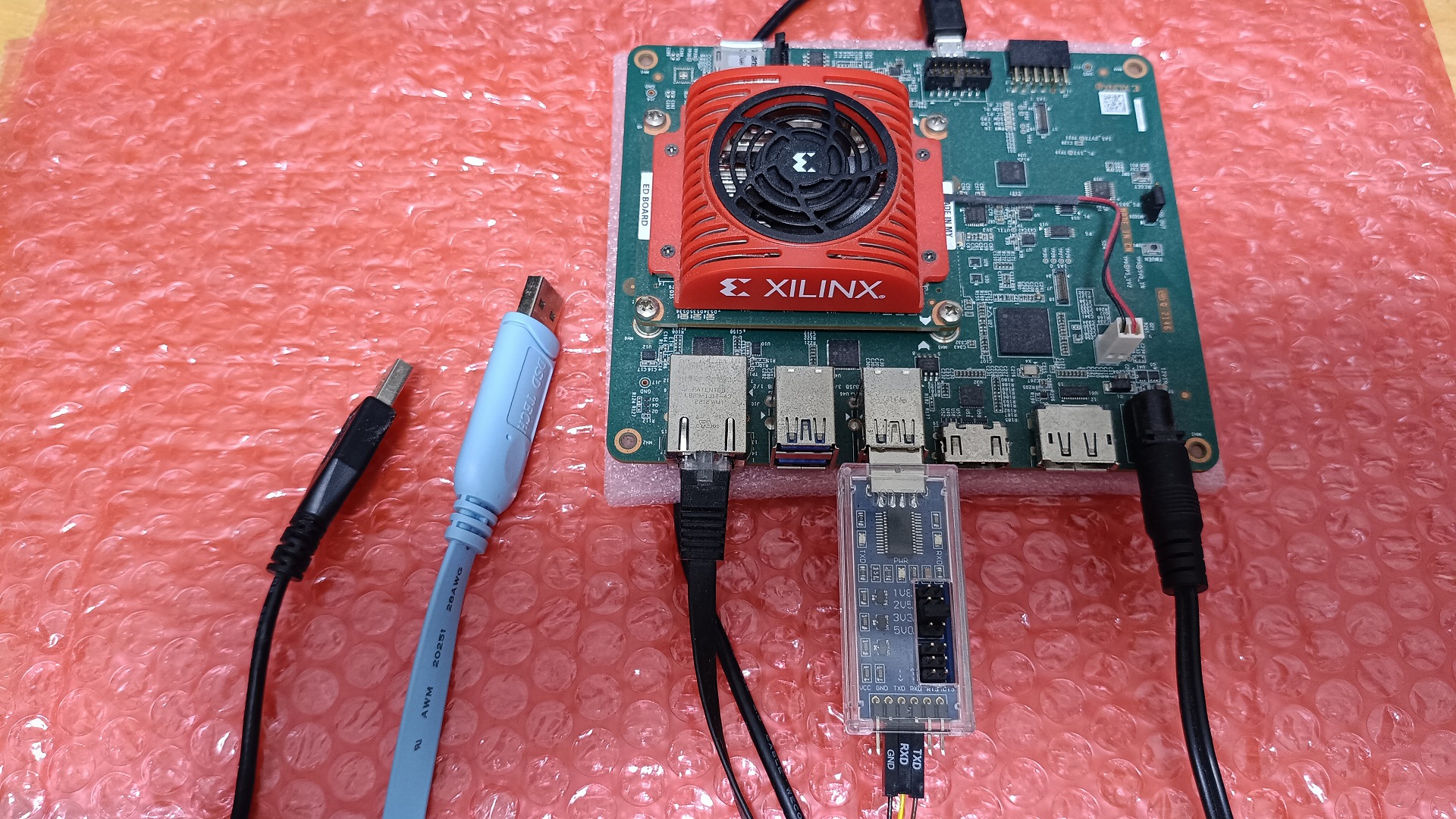
KV260のR5コアにZephyr(RTOS)を実装してみました。
Zephyrの公式ドキュメント通り、まずはテストしてみました。
PetaLinuxのインストールからBSPビルドの自分用のメモです。
KV260のR5コアにZephyr(RTOS)を実装してみる
KV260のR5コアにZephyr(RTOS)を実装してみました。
Zephyrの公式ドキュメント通り、まずはテストしてみました。
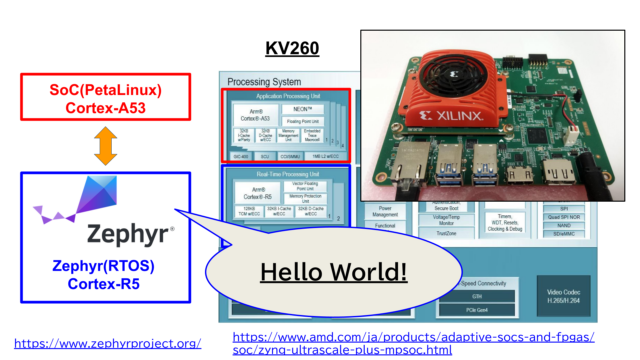
PetaLinuxのインストールからBSPビルドの自分用のメモです。
デモ動画が下記となっています。
詳細は下記hackster.ioの記事でも書いています。

参考記事
下記記事を参考にしながら実施しています。今回は同じ手順を沿っているだけです。
作成者の方、有益な情報をありがとうございました。この場を借りてお礼申し上げます。
(本記事の自分のメモより、下記記事の方が丁寧に書かれています。)

PetaLinux
AMDからPetaLinux 2025.2をダウンロードして、インストールします
https://japan.xilinx.com/support/download/index.html/content/xilinx/ja/downloadNav/embedded-design-tools.html
|
1 2 3 4 5 6 |
chmod 777 ./petalinux-v2025.2-11160223-installer.run sudo mkdir /opt/petalinux/2025.2 id sudo chown -R USER_NAME:USER_GROUP /opt/petalinux/2025.2/ sudo chown -R misoji /opt/petalinux/2025.2/ ./petalinux-v2025.2-11160223-installer.run -d /opt/petalinux/2025.2/ |
細かいライブラリのインストールや、インストール後のsettingに関しては下記記事と同じです。

BSPファイルのダウンロード
ビルド元のBSPファイルは下記にありますので、ダウンロードしてpetalinuxを動かします。
https://xilinx-wiki.atlassian.net/wiki/spaces/A/pages/1641152513/Kria+SOMs+Starter+Kits#PetaLinux-Board-Support-Packages
|
1 2 3 4 5 6 7 8 |
petalinux-create -t project -s xilinx-kv260-starterkit-v2025.1-05221048.bsp cd xilinx-kv260-starterkit-2025.1/ sudo sysctl -w kernel.apparmor_restrict_unprivileged_userns=0 petalinux-config -c kernel petalinux-config petalinux-build petalinux-package --boot --u-boot --force petalinux-package --wic --images-dir images/linux/ --bootfiles "ramdisk.cpio.gz.u-boot,boot.scr,Image,system.dtb,system-zynqmp-sck-kv-g-revB.dtb" |
参考記事にも記載しているように、KV260のMicroUSBをZephyr専用のUARTにします。
そのため何時ものKV260でのpetalinuxのログインに使えなくなります。
USBシリアルドライバの設定
LANのSSH経由で作業しますが、petalinux側もシリアル通信できるようにした方が楽です。
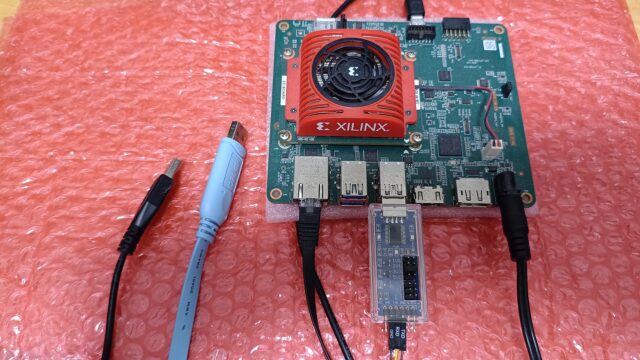
USBからシリアルケーブルを繋いでUSBtty0でもログイン通信できるようにします。
下記形のUSBシリアルを2個使ったです。片方はPC、片方はKV260です。
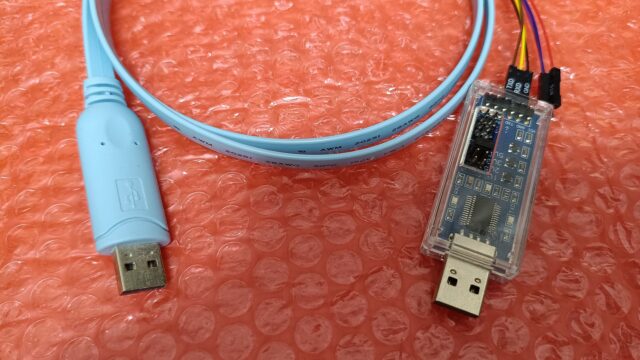
USBシリアルコンソール、また使うシリアルドライバの設定をONにします。
petalinux-config -c kernel
Device Drivers -> USB support -> USB Serial Converter support ->
・USB Serial Console device support:
・USB FTDI Single Port Serial Driver(筆者の一例)
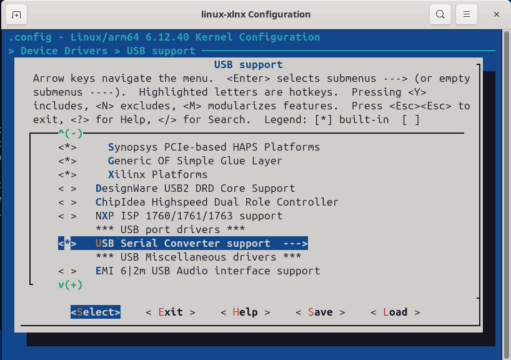
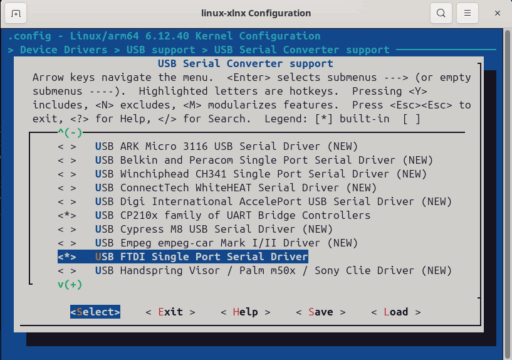
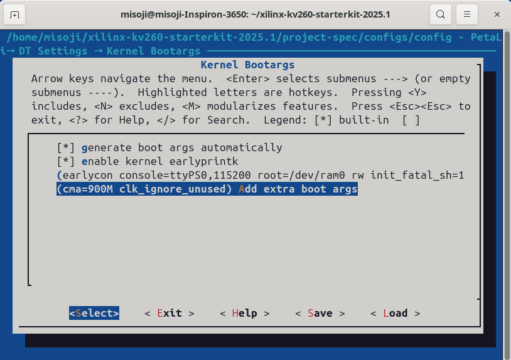
参考記事通りに、petalinux-config の方も対応しておきます
DT Settings-> Kernel Bootargs-> clk_ignore_unusedをAdd extra argsに追記。
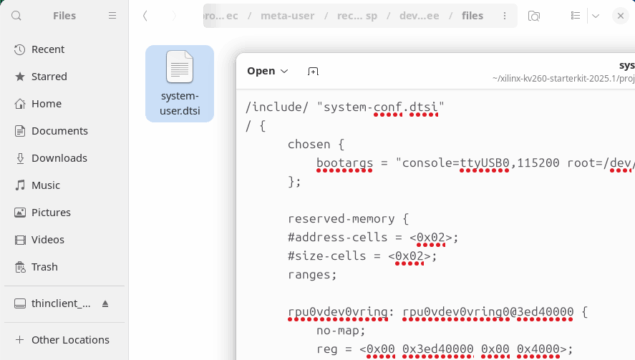
system-user.dtsi
参考記事通り、system-user.dtsiを編集します
/xilinx-kv260-starterkit-2025.1/project-spec/meta-user/recipes-bsp/device-tree/files/system-user.dtsi
|
1 2 3 4 5 6 7 8 9 10 11 12 13 14 15 16 17 18 19 20 21 22 23 24 25 26 27 28 29 30 31 32 33 34 35 36 37 38 39 40 41 42 43 44 45 46 47 48 49 50 51 52 53 54 55 56 57 58 59 60 61 62 63 64 65 66 67 68 69 70 71 72 73 74 75 76 77 78 79 80 81 82 83 84 85 86 87 88 89 90 91 92 93 94 95 96 97 98 99 100 101 102 103 104 105 |
/include/ "system-conf.dtsi" / { chosen { bootargs = "console=ttyUSB0,115200 root=/dev/ram0 rw init_fatal_sh=1 cma=900M clk_ignore_unused"; }; reserved-memory { #address-cells = <0x02>; #size-cells = <0x02>; ranges; rpu0vdev0vring: rpu0vdev0vring0@3ed40000 { no-map; reg = <0x00 0x3ed40000 0x00 0x4000>; }; rpu0vdev0vring1: rpu0vdev0vring1@3ed44000 { no-map; reg = <0x00 0x3ed44000 0x00 0x4000>; }; rpu0vdev0buffer: rpu0vdev0buffer@3ed48000 { no-map; reg = <0x00 0x3ed48000 0x00 0x100000>; }; rproc: rproc@3ed00000 { no-map; reg = <0x00 0x3ed00000 0x00 0x40000>; }; }; tcm_0a: tcm_0a@ffe00000 { reg = <0x0 0xffe00000 0x0 0x10000>; status = "okay"; compatible = "mmio-sram"; power-domains = <&zynqmp_firmware 15>; }; tcm_0b: tcm_0b@ffe20000 { no-map; reg = <0x0 0xffe20000 0x0 0x10000>; status = "okay"; compatible = "mmio-sram"; power-domains = <&zynqmp_firmware 16>; }; r5fss@ff9a0000 { compatible = "xlnx,zynqmp-r5fss"; xlnx,cluster-mode = <1>; ranges; reg = <0x0 0xFF9A0000 0x0 0x10000>; status = "okay"; #address-cells = <0x2>; #size-cells = <0x2>; r5f_0: r5f@0 { compatible = "xilinx,r5f"; #address-cells = <0x2>; #size-cells = <0x2>; ranges; memory-region = <&rproc &rpu0vdev0buffer &rpu0vdev0vring &rpu0vdev0vring1>; power-domains = <&zynqmp_firmware 7>; mboxes = <&ipi_mailbox_rpu0 0>, <&ipi_mailbox_rpu0 1>; mbox-names = "tx", "rx"; tcm_0_a: tcm_0@ffe00000 { reg = <0x0 0xFFE00000 0x0 0x10000>; status = "okay"; compatible = "mmio-sram"; power-domains = <&zynqmp_firmware 15>; }; tcm_0_b: tcm_0@ffe20000 { reg = <0x0 0xFFE20000 0x0 0x10000>; status = "okay"; compatible = "mmio-sram"; power-domains = <&zynqmp_firmware 16>; }; }; }; zynqmp_ipi1 { compatible = "xlnx,zynqmp-ipi-mailbox"; interrupt-parent = <&gic>; interrupts = <0 29 4>; xlnx,ipi-id = <7>; #address-cells = <1>; #size-cells = <1>; ranges; /* APU<->RPU0 IPI mailbox controller */ ipi_mailbox_rpu0: mailbox@ff990600 { compatible = "xlnx,zynqmp-ipi-dest-mailbox"; reg = <0xff990600 0x20>, <0xff990620 0x20>, <0xff9900c0 0x20>, <0xff9900e0 0x20>; reg-names = "local_request_region", "local_response_region", "remote_request_region", "remote_response_region"; #mbox-cells = <1>; xlnx,ipi-id = <1>; }; }; }; |
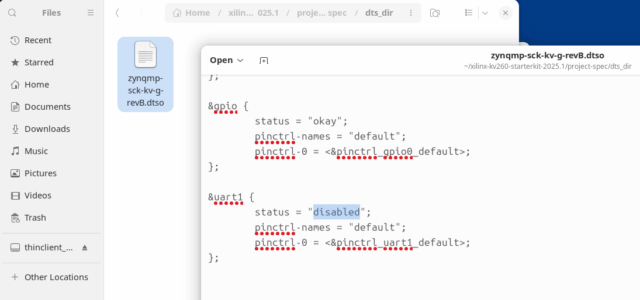
zynqmp-sck-kv-g-revB.dtso
参考記事通りに、uart1はpetalinux側ではdisabledにします。
/xilinx-kv260-starterkit-2025.1/project-spec/dts_dir
|
1 2 3 4 5 |
&uart1 { status = "disabled"; pinctrl-names = "default"; pinctrl-0 = <&pinctrl_uart1_default>; }; |
petalinuxのビルド、書き込み
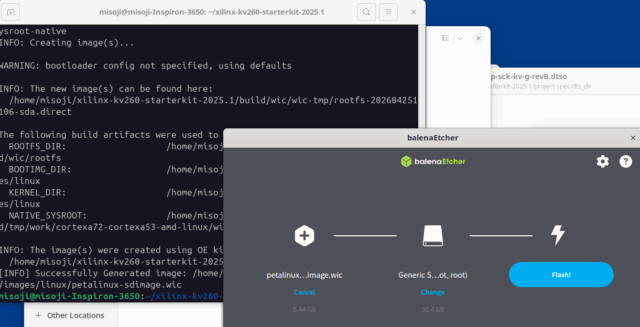
petalinuxのビルドをします。
|
1 2 3 |
petalinux-build petalinux-package --boot --u-boot --force petalinux-package --wic --images-dir images/linux/ --bootfiles "ramdisk.cpio.gz.u-boot,boot.scr,Image,system.dtb,system-zynqmp-sck-kv-g-revB.dtb" |
wicファイルが出来たら、Balenaetcherなど使って書き込みます。
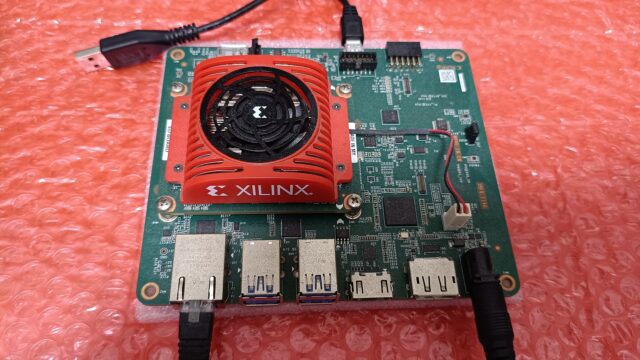
KV260を起動するとUSBシリアル経由(ttyUSB0)でログインできます。
|
1 2 3 4 5 6 7 8 9 10 11 12 |
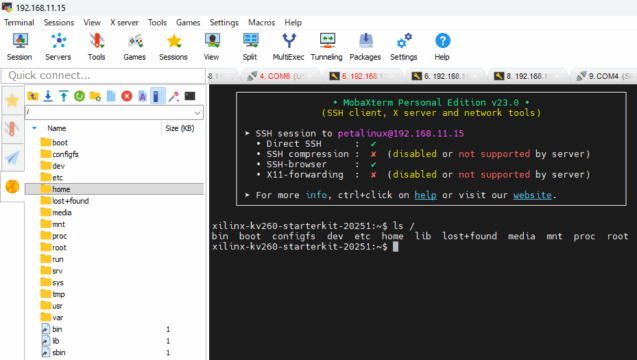
******************************************************************************************** PetaLinux 2025.2+release-S11151021 xilinx-kv260-starterkit-20251 ttyUSB0 xilinx-kv260-starterkit-20251 login: petalinux You are required to change your password immediately (administrator enforced). New password: Retype new password: Apr 25 04:13:30 xilinx-kv260-starterkit-20251 kernel: kauditd_printk_skb: 14 callbacks suppressed xilinx-kv260-starterkit-20251:~$ xilinx-kv260-starterkit-20251:~$ ls / bin boot configfs dev etc home lib lost+found media mnt proc root run sbin srv sys tmp usr var xilinx-kv260-starterkit-20251:~$ |
一度ログインできてしまえば、LANのSSHからも自由にアクセスできます。
出来る人はSSHだけで、初期ログインできるかもしれません。
筆者は試したけどできませんでした。
Zephyrのビルド
下記Zephyrの公式資料を基にビルドを進めます
https://github.com/zephyrproject-rtos/zephyr/blob/main/boards/amd/kv260_r5/doc/index.rst
|
1 |
(.venv) C:\Users\ioten\zephyrproject\zephyr>west build -p -b kv260_r5 samples/hello_world |
PCでHello Worldをビルドした結果は下記形です。
|
1 2 3 4 5 6 7 8 9 10 11 12 13 14 15 16 17 18 19 20 21 22 23 24 25 26 27 28 29 30 31 32 33 34 35 36 37 38 39 40 41 42 43 44 45 46 |
(.venv) C:\Users\ioten\zephyrproject\zephyr>west build -p -b kv260_r5 samples/hello_world -- west build: making build dir C:\Users\ioten\zephyrproject\zephyr\build pristine -- west build: generating a build system Loading Zephyr default modules (Zephyr base). -- Application: C:/Users/ioten/zephyrproject/zephyr/samples/hello_world -- CMake version: 4.1.0 -- Found Python3: C:/Users/ioten/zephyrproject/.venv/Scripts/python.exe (found suitable version "3.13.5", minimum required is "3.10") found components: Interpreter -- Cache files will be written to: C:/Users/ioten/zephyrproject/zephyr/.cache -- Zephyr version: 4.3.99 (C:/Users/ioten/zephyrproject/zephyr) -- Found west (found suitable version "1.5.0", minimum required is "0.14.0") -- Board: kv260_r5, qualifiers: zynqmp_rpu -- ZEPHYR_TOOLCHAIN_VARIANT not set, trying to locate Zephyr SDK -- Found host-tools: zephyr 0.17.4 (C:/Users/ioten/zephyr-sdk-0.17.4) -- Found toolchain: zephyr 0.17.4 (C:/Users/ioten/zephyr-sdk-0.17.4) -- Found Dtc: C:/Users/ioten/AppData/Local/Microsoft/WinGet/Packages/oss-winget.dtc_Microsoft.Winget.Source_8wekyb3d8bbwe/usr/bin/dtc.exe (found suitable version "1.6.1", minimum required is "1.4.6") -- Found BOARD.dts: C:/Users/ioten/zephyrproject/zephyr/boards/amd/kv260_r5/kv260_r5.dts -- Generated zephyr.dts: C:/Users/ioten/zephyrproject/zephyr/build/zephyr/zephyr.dts -- Generated pickled edt: C:/Users/ioten/zephyrproject/zephyr/build/zephyr/edt.pickle -- Generated devicetree_generated.h: C:/Users/ioten/zephyrproject/zephyr/build/zephyr/include/generated/zephyr/devicetree_generated.h C:/Users/ioten/zephyrproject/zephyr/build/zephyr/zephyr.dts:460.38-469.5: Warning (interrupt_provider): /soc/interrupt-controller@f9000000: Missing #address-cells in interrupt provider Parsing C:/Users/ioten/zephyrproject/zephyr/Kconfig Loaded configuration 'C:/Users/ioten/zephyrproject/zephyr/boards/amd/kv260_r5/kv260_r5_defconfig' Merged configuration 'C:/Users/ioten/zephyrproject/zephyr/samples/hello_world/prj.conf' Configuration saved to 'C:/Users/ioten/zephyrproject/zephyr/build/zephyr/.config' Kconfig header saved to 'C:/Users/ioten/zephyrproject/zephyr/build/zephyr/include/generated/zephyr/autoconf.h' -- Found GnuLd: c:/users/ioten/zephyr-sdk-0.17.4/arm-zephyr-eabi/arm-zephyr-eabi/bin/ld.bfd.exe (found version "2.38") -- The C compiler identification is GNU 12.2.0 -- The CXX compiler identification is GNU 12.2.0 -- The ASM compiler identification is GNU -- Found assembler: C:/Users/ioten/zephyr-sdk-0.17.4/arm-zephyr-eabi/bin/arm-zephyr-eabi-gcc.exe -- Found gen_kobject_list: C:/Users/ioten/zephyrproject/zephyr/scripts/build/gen_kobject_list.py -- Configuring done (48.7s) -- Generating done (0.4s) -- Build files have been written to: C:/Users/ioten/zephyrproject/zephyr/build -- west build: building application [1/130] Generating include/generated/zephyr/version.h -- Zephyr version: 4.3.99 (C:/Users/ioten/zephyrproject/zephyr), build: v4.3.0-3034-g2062a21ed267 [130/130] Linking C executable zephyr\zephyr.elf Memory region Used Size Region Size %age Used FLASH: 0 GB 32 MB 0.00% RAM: 37760 B 64 MB 0.06% OCM: 0 GB 256 KB 0.00% IDT_LIST: 0 GB 32 KB 0.00% Generating files from C:/Users/ioten/zephyrproject/zephyr/build/zephyr/zephyr.elf for board: kv260_r5 (.venv) C:\Users\ioten\zephyrproject\zephyr> |
HelloWorldの実行
SSHさえ通っていれば、自由にファイルをKV260に渡せます。
指定のフォルダにコピーして実行します。
|
1 2 3 4 |
xilinx-kv260-starterkit-20251:~$ sudo cp zephyr.elf /lib/firmware/ xilinx-kv260-starterkit-20251:~$ sudo -i root@xilinx-kv260-starterkit-20251:~# echo zephyr.elf > /sys/class/remoteproc/remoteproc0/firmware root@xilinx-kv260-starterkit-20251:~# echo start > /sys/class/remoteproc/remoteproc0/state |
KV260のMicroUSBのUSBシリアルから無事メッセージが出ました。
|
1 2 |
*** Booting Zephyr OS build v4.3.0-3034-g2062a21ed267 *** Hello World! kv260_r5/zynqmp_rpu |
冒頭でも紹介しましたが、デモ動画が下記となっています。
まとめ
KV260のR5コアにZephyr(RTOS)を実装してみました。
Zephyrの公式ドキュメント通り、まずはテストしてみました。
PetaLinuxのインストールからBSPビルドの自分用のメモでした。
下記記事を参考にしながら実施しています。今回は同じ手順を沿っているだけです。
作成者の方、有益な情報をありがとうございました。この場を借りてお礼申し上げます。
コメント